PPAG 101: Advanced Price Sheets
So you've created your price sheet(s) and are ready to dig in deeper with what PPAG has to offer. Look no further than these tips our power users make the most use of!
As always, head to https://app.propowerag.com to access our app on the web, or download our app free on the iOS App Store to utilize the same features!
Menu bar options

- Refresh
- Filter
- Quickly find herbicide solutions with advanced filters
- Edit
- Change the price sheet name
- Bulk adjust prices
- PDF
- Export your price sheets to PDFs, ready to print, email, text or mail to anybody
- More
- Copy
- Sharing
- Delete
Bulk adjusting prices
Say that you created your in-season price sheet, but you want to run a discount on pre-season orders. Or say that you want to share a smaller price sheet with a grower that buys in bulk and you'd like to adjust prices accordingly. Bulk price adjustment is perfect for that!

To open the menu, click Edit > Adjust Prices.
In this scenario all of the prices in this sheet would be discounted by 8% with a visual showing a $100 product would now be $92. The tool works in a positive direction as well where you could introduce a markup price as well for the entire sheet.
Pro tip: A great way to quickly handle bulk price adjustments is to create a copy of an existing price sheet and adjust the prices of the copied sheet.
Sharing
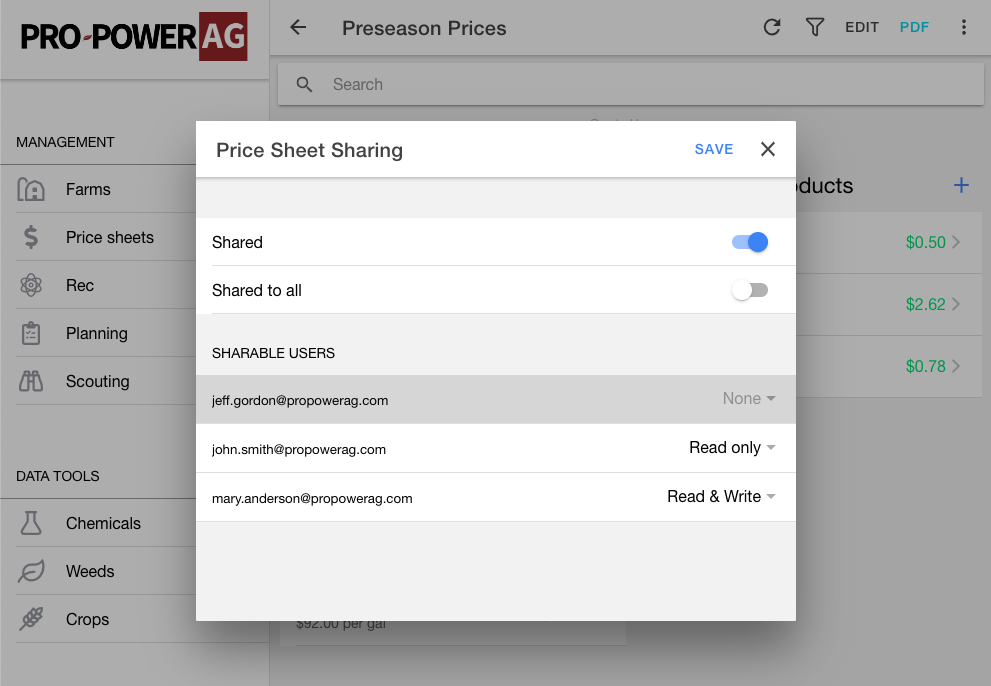
Sharing is a great way to keep your team and/or growers on board! You can share a price sheet to all available users in read/write format, or you can configure which users have access.
As the owner of a price sheet you can determine three levels of access for any other given user:
- No access
- Read only
- User cannot modify the price sheet in any way
- Read & Write
- User can modify any herbicide, product, price, or the sheet name
- User cannot delete the sheet
With these powerful tools, gone are the days of miscommunication and confusion regarding communication of input prices!