PPAG 101: Price Sheets
Herbicide planning continues to get more complex due to new legislation and restrictions. Additionally, special programs, bulk-pricing models, and pre-season discounts can make price sheet management a cumbersome task. To keep yourself, your coworkers, and most importantly your customers up to date on your latest herbicide prices, effective price sheet management is key.
This article will demonstrate how easy it is to manage your price sheets with Pro Power Ag.
Disclaimer: The examples provided here are from the latest Pro Power Ag web app, but all the same features are available on our mobile app available on the iOS App Store!
Easy as 1-2-3
- Create a new price sheet
- Enter your herbicides and products
- Use your price sheet throughout the application
It's truly that easy. This part may take a little time to get set up properly, but is crucial in getting the most out of the application!
Head to https://app.propowerag.com to visit the web app, or download our app on the iOS App Store.
If you'd like some more help getting started, we've provided a guided tutorial below! If you already know the basics and would like some more advanced usage tips. Check out our advanced article about price sheets!
Creating your first price sheet
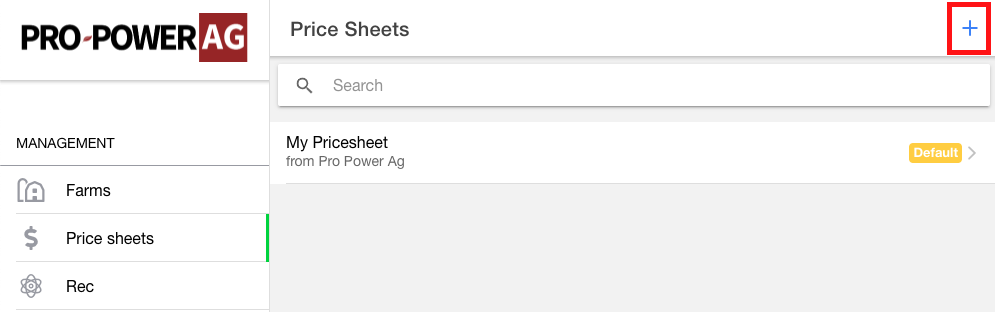
Navigate to the Price sheets tab on the side menu. This is where all of your price sheets will be listed. For convenience, we provide a default price sheet for your own reference and use. The prices are loosely based on word-of-mouth and should be used more for guidance rather than rock-solid pricing.
To create a price sheet, press the blue plus sign in the top right of the page. You will be asked to give it a name and voila!
We're going to call ours Preseason Prices.
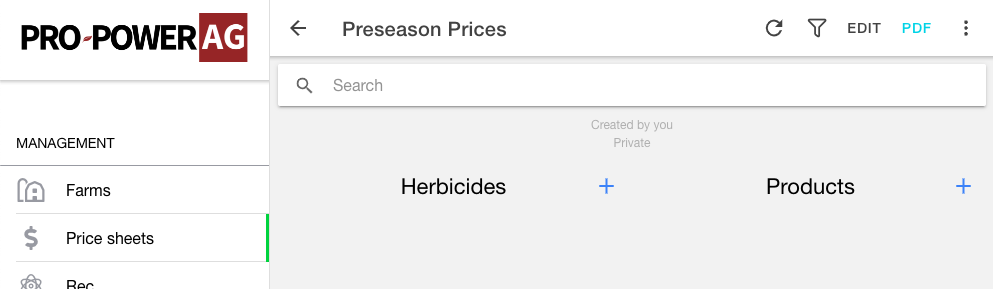
Your price sheet will open and you will be greeted by this relatively empty space.
Herbicides vs. Products
The most prominent features of the price sheets are Herbicides and Products. Put simply, a product is anything that we don't have performance data for. For example. Pro Power Ag cannot quantify how much AMS contributes to the efficacy of a tank mix (yet), or how much a certain surfactant might affect your weed pressure. However, these products are vital parts of creating a recommendation and need to be included as such.
Our users might include Variable Rate Technology as a per/acre charge, or mapping, scouting, fertilizers, pesticide, fungicide, etc. Anything that is not a herbicide can be created as a product!
Entering your prices

Press the respective blue plus signs to get started adding your chemicals and products.
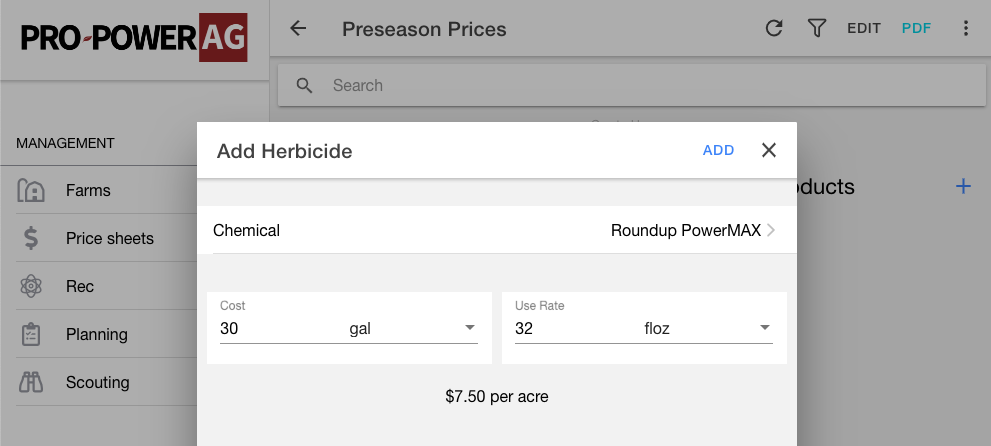
Upon selecting to add a herbicide you can use the searchable list to select which herbicide you would like to add. Remember that the only herbicides available in this list are chemicals that have weed performance tied to them.
If you don't see a chemical in this list, don't fear! You can create a custom chemical of your very own! More on that later.
Before adding the herbicide, fill in the cost per unit, and use rate. Allowing PPAG to automatically calculate your price/acre. Press the blue 'Add' button on the popup to complete!
Advanced Usage
Now that you've got the basics mastered, check out our article on advanced usage of price sheets!